

SERP Tracking API: How It Works for Rank Tracking
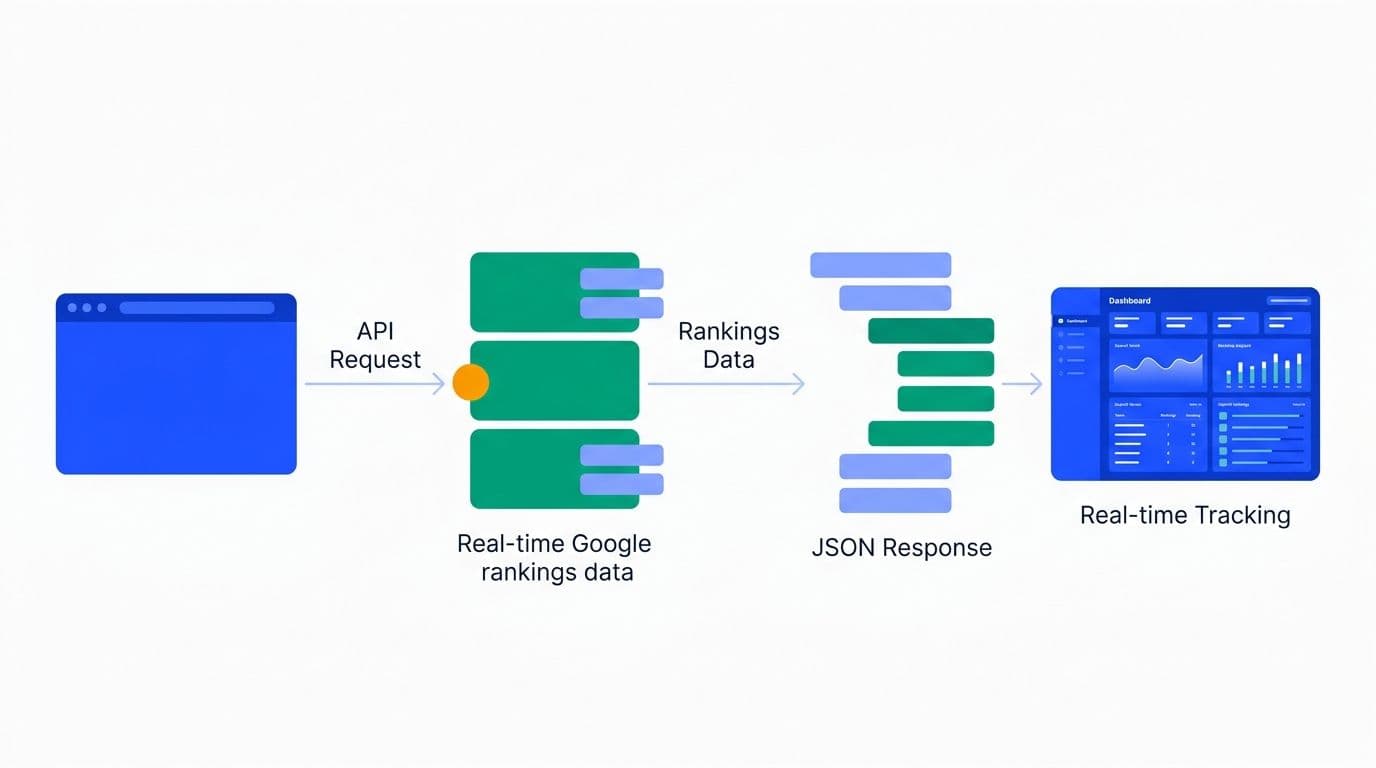
If you are building rank tracking, a SERP tracking API is the piece that turns a keyword plus a location into a structured list of what Google actually showed. You send a query, a geography, a device, and a language. You get back organic results with positions, plus the SERP features that now take up most of the page. AI Overviews, local packs, People Also Ask, shopping units, video carousels all count.
That sounds simple. It stops being uncomplicated the moment you need a hundred thousand keywords a day, from forty cities, with consistent position numbering across weeks, and a cost per check you can actually put on a pricing page. This guide covers how a SERP tracking API works end to end, how to compare pricing across wildly different billing models, and how to verify the data you get back. It also covers what to do about AI Overviews breaking the position numbers you have reported for years.
What a SERP tracking API does, in one answer
A SERP tracking API runs a live Google search on your behalf, from the location and device you specify, and returns the parsed page as JSON instead of HTML. It handles the parts you do not want to own: residential or datacenter egress, request shaping, retries when a result page comes back empty or challenged, and parsing of a layout Google changes without notice.
What you get back is an array of organic items with a position field, a URL, a title, a snippet, and usually a flag for which block the item belongs to. Separate arrays carry the SERP features. Your rank tracker then does the only job that is actually yours: it matches your tracked domains against those arrays, stores the position with a timestamp, and charts it.
The distinction worth holding onto is that a search rankings API does not know what your "rank" is. It reports what was on the page. Rank is a decision your application makes. Whether a sitelink counts, whether position means organic-only or absolute pixel order, whether a video carousel with your YouTube channel counts as a win, all of that lives in your logic, not the API's. Most of the disagreements between two rank trackers looking at the same SERP come from that layer, not from the raw data underneath it.
If you are still deciding whether to scrape Google yourself, our guide on is there an api for google search covers the build-versus-buy math before you commit engineering time.
How a keyword becomes a ranking position
The request path is short. Your scheduler picks the keywords due for a check, batches them, and fires requests at the API with the parameters attached to each keyword. Query string, country, city or other location code, language, device, and sometimes results per page all travel with the request. The API resolves that into a live search, parses the response, and hands back JSON.
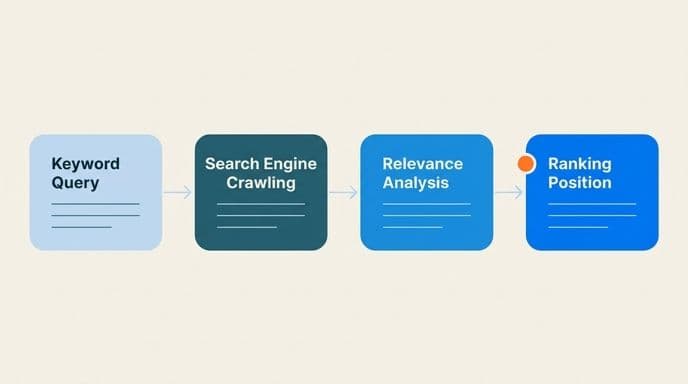
Your side then does three things. First, normalize URLs: strip tracking parameters, resolve trailing slashes, decide whether www and bare domains are the same property. Second, match. A naive contains(domain) match will give you false positives from any page that mentions your brand in its URL path, so match on registrable domain plus optional path prefix. Third, write an immutable row with keyword ID, date, position, URL that ranked, device, location, and the raw feature flags.
Keep the raw JSON, though not forever. A rolling window of a few weeks is enough to answer "why did this keyword drop" without re-querying.
One thing that catches people on the first build: positions are not stable within a single day. Two checks four hours apart can legitimately differ, especially on volatile queries. Decide early whether your product reports the latest check, a daily median, or a fixed check window, and say so in your UI. That is a product decision a google serp checker api cannot make for you.
Location, language, and device: the parameters that decide your numbers
Some APIs take a country code only. Some take a Google canonical location name, a long string that must match an internal list exactly. Some take a numeric location code from a published taxonomy, and some accept coordinates with a radius for local-pack work.
Standardize internally on one canonical representation, and keep that discipline consistent across every part of your pipeline. We recommend storing ISO country code, a city or region string, and optional coordinates, then mapping to whatever the provider wants at request time. Never let a raw provider location string leak into your database schema, because you will need to swap it. Always echo the resolved location back into your stored result row, so you can prove which geography produced a number.
Language and device are smaller but equally consequential. Language affects which SERP features appear, not just the interface. Mobile and desktop are genuinely different result sets, not a rendering difference, so track them as separate keyword rows rather than as a display toggle. A search rankings API that returns one position for a keyword without telling you which device it came from is not giving you enough to work with.
Coverage is finite, and it is worth checking against your customer list before you commit. Our own Google SERP API covers 100+ countries with city, language, and device localization.
Synchronous vs asynchronous endpoints
Most SERP work splits into two patterns, and picking the wrong one costs you either latency or throughput.
A synchronous call blocks until the search completes and returns parsed JSON in the response body. That is what you want for anything user-facing. An on-demand rank check inside a dashboard, a keyword research tool where someone typed a query, or an agent making a tool call mid-conversation all fit this pattern.
Asynchronous processing is what you want for scheduled bulk tracking. You submit a batch of jobs, get back job IDs, and either poll for completion or receive a webhook.
The pragmatic architecture is both. That way you control the backoff policy rather than inheriting a vendor's.
One practical detail for whichever pattern you choose: make failed requests cheap. With DataBlue, a request that returns no data does not consume a credit, which means an aggressive retry policy on a flaky keyword does not quietly inflate your bill. Check how your current provider handles that, because billing for empty responses changes the economics of bulk tracking more than the headline rate does.
What a SERP checker API costs per 1,000 keywords
Normalize everything to one number before you compare. That number is fully loaded cost per 1,000 tracked keyword-checks, including retries, the extra charge for whatever SERP features you need parsed, and any credits you lose at the end of a billing period. Build a small spreadsheet with your real volume, your real location mix, and your real device split, rather than comparing list prices on marketing pages.

Pricing across the market varies widely, and that variance itself is worth paying attention to when you compare vendors. Some vendors charge an order of magnitude more than that for comparable data. A spread that wide is a signal: the headline rate is often not the thing you pay.
Expiring credits, hidden multipliers, and billing for failed or empty responses are the three billing behaviors that deserve specific scrutiny. Expiring credits mean seasonal workloads pay for capacity they never use. Hidden multipliers mean an endpoint you assumed was one credit is five. Billing for failed or empty responses turns reliability problems into revenue for the vendor.
Full numbers are on pricing.
Is a free tier enough to test production?
Usually, yes, and this is worth saying because teams routinely over-prepare for an evaluation. A free tier in the low hundreds of live credits is enough to validate everything that actually matters: confirming the JSON shape fits your parser, your location mapping resolves correctly, the device split behaves, the features you depend on are present, and latency under your concurrency is acceptable.
What a free tier cannot tell you is behavior at sustained volume. Rate-limit ceilings, consistency across a long run, and how support responds outside business hours are all things you only learn after you commit real traffic. So split your evaluation. Use the free credits to prove the integration, then run a paid month at a fraction of your target volume before migrating everything.
A good evaluation script does the same thing every time. Take twenty keywords you know well, ones where you can eyeball the real SERP, across at least three countries and both devices. Run them through the candidate API. Compare the organic array against what you see in an incognito browser with matching settings, checking that positions line up, that the features you care about are flagged, and that nothing silently falls back to a default locale.
DataBlue gives you 1,000 one-time signup credits with no credit card, which is more than enough to run that script a few times and still have room to prototype. If your evaluation needs more than that to reach a decision, the bottleneck is usually an unclear requirement on your side rather than the credit allowance.
How to verify tracker data against the raw SERP
Every rank tracking product eventually gets the same support ticket: "this keyword says we dropped but we are clearly ranking." Having a verification procedure turns that from a guessing game into a five-minute check.
The procedure is straightforward. Pull the advanced SERP result for the disputed keyword using exactly the same location, device, and language parameters the tracker used. Then look for your domain in the organic items array. If it is there at the position the customer expects, the raw data is fine and your report logic is misreading it, most often because a SERP feature consumed the slot and your classification rules dropped the row. If it is not there, the ranking genuinely changed, or your location parameter resolved somewhere you did not intend.
Keywords that look like they vanished from reports are frequently still ranking first organically with healthy traffic. The discrepancy traces back to how the tracker counts features rather than to what Google returned.
Build this into the product, not just your runbook. A "view raw SERP" button on every tracked keyword, showing the stored payload and the exact parameters used, resolves disputes before they become tickets and builds trust in your numbers. It also forces a discipline that pays off. If you cannot reproduce a reported position from a stored payload, your pipeline is losing information somewhere between the API response and the chart.
Tracking AI Overviews visibility and impressions
AI Overviews have changed what a position number means, and measurement has not fully caught up. A keyword where you rank first organically can still lose most of its clicks to a generated summary above the fold. Reporting position one without reporting what sits above it is now misleading.

What a SERP tracking API should give you here is the presence of an AI Overview, the sources cited inside it, and where the organic block starts relative to it. That lets you build the two metrics that actually matter. AI Overview presence rate across your keyword set, and citation share, how often your domain appears as a cited source, are increasingly part of how visibility gets reported, and they are distinct from classic position.
Several trackers appear to drop keywords from reports when an AI Overview is present, because the feature confuses their position classification, and that is a reporting trap worth watching for. The result looks like a ranking collapse on a keyword that is performing fine. If your dashboards show keywords disappearing rather than moving, check your feature-classification rules before you assume Google demoted anything.
Click measurement is shifting too. Google has been rolling out google.com/goto tracking parameters across search results, which changes how referrer and click data can be captured downstream. That does not affect what a google serp checker api returns, but it does affect how you reconcile SERP visibility with analytics. Keep the two data sources clearly separated in your reporting model rather than quietly blending them.
Google Search Console vs a third-party search rankings API
Treat Search Console as the source of truth for your own properties, and treat any third-party tracker as a trend indicator. That is not a knock on SERP APIs. It describes what each data source can actually know.
GSC reports what Google actually served to real users, aggregated across every personalization, location, and device in your real audience. A third-party search rankings API reports what one unpersonalized query from one location returned at one moment. Those will never match exactly, and a product that promises they will is setting up its own support queue.
Show GSC average position and impressions alongside tracked position and feature flags. When they diverge, the divergence is itself the insight, since a keyword with a rising tracked position and flat impressions usually means a feature is absorbing the clicks.
GSC alone cannot answer the competitive question, since it has no visibility into anyone else's rankings, and that gap is exactly where a third-party Google API SERP position feed becomes necessary once competitors enter the picture.
Building a SERP tracking whitelabel API for your customers
If you sell rank tracking to agencies, they will eventually ask for API access under their own brand. A serp tracking whitelabel api is your layer on top of a data provider, not the provider's endpoint handed through with a new domain name.
The architecture is a thin proxy with real substance behind it. Your API issues its own keys, enforces its own quotas, applies your position logic and feature classification, serves from your stored results rather than hitting the upstream provider per call, and returns your schema. Customers never see the underlying vendor, and you can change that vendor without breaking a single integration.
Caching, metering, and schema versioning are what make this work in practice. Cache aggressively on your side, since a tracked keyword checked once a day should serve the same stored result to a hundred API calls rather than triggering a hundred searches. Meter in your own units, because your customers should buy "keyword checks," not your supplier's credits. Version your schema from day one, because position semantics will change again the next time Google ships a layout.
The commercial reason to own this layer is margin control. When you resell raw provider output, your pricing is pinned to theirs. A rank-tracking product built on top of our Google SERP API shows exactly this shape: its own schema, its own customer relationships, our data underneath, all working together.
If you are building a serp tracking whitelabel api for agencies, that is the pattern to copy.
Legal and compliance risks
Be straight with yourself here. Scraping public search results is widely practiced and the data is not personal in most cases, but "widely practiced" is not the same as "always permitted." Google's terms of service restrict automated access, and whether a given jurisdiction treats that as actionable depends on the jurisdiction, the volume, and what you do with the output. We are not going to tell you scraping is legal everywhere regardless of a site's terms, because it is not.

Practical risk management looks like this. Keep the data you store limited to what your product needs, positions, URLs, titles, and feature flags, and avoid hoarding full page copies indefinitely. If your SERP results happen to include personal data, which they can for name queries, handle it under the same policies you apply to any other personal data you process. Write your data retention policy down before a customer's procurement team asks for it.
On vendor diligence, ask the questions that matter and expect candid answers.
What we do commit to is live scraping on every request with no stale cache, so you are never billed for or reporting on data that was collected days ago under conditions you cannot reconstruct.
What breaks when you migrate SERP providers
Migration is mostly schema mapping, and the effort is real but bounded. The work splits into four parts: response field mapping, location parameter translation, error and retry semantics, and billing unit conversion, each needing its own pass.
Field mapping is the visible part. Organic arrays are structured differently across vendors. Some nest results under a container, some flatten, some number positions from zero, and some include ads in the position count. Write a translation layer rather than changing your database schema, and keep both providers running in parallel for a week so you can diff them keyword by keyword.
Location translation is the part that bites silently. If your old provider accepted canonical location strings and the new one expects codes, a bad mapping does not error. It returns results for the wrong place instead. Validate the mapping on a sample set in every country you serve before cutover.
Error semantics matter more than teams expect. Know which status codes mean "retry," which mean "this keyword has no results," and which mean "you are rate limited." Treating a no-results response as a failure will corrupt your historical charts with gaps.
The honest timeline: a well-structured tracker with a clean provider abstraction can move in a day, helped by our Firecrawl-compatible response schema. A tracker with provider-specific field names scattered through the codebase takes longer. If you are weighing a switch, our serp api alternative comparison lays out the differences in billing model and output format side by side.
Where a google serp checker API fits beyond rank tracking
Rank tracking is the obvious use case, but it is not the only one, and the adjacent use cases often justify the integration on their own.
Content teams use a serp checker api to read intent before writing. Pulling the top results, People Also Ask questions, and feature mix for a keyword helps decide format and depth. That is a synchronous, low-volume, high-value call pattern, very different from bulk tracking.
AI agents and RAG pipelines use search as a retrieval step. An agent that needs current information issues a query, takes the top result URLs, then fetches and cleans those pages. That is two different endpoints working together, search to find and extraction to read.
Competitive monitoring is a third pattern. It tracks which domains gain and lose share of a keyword set over time, independent of your own rankings. This is where a google serp checker api earns its keep for strategy work rather than reporting.
The practical implication for your build is to avoid wiring your integration exclusively around nightly rank checks. Expose the search call as an internal service with location, device, and language as first-class arguments, and the other use cases become a few lines of code instead of a second integration.
What we do and do not cover
A clear scope is more useful than a feature list. We give you live Google search results as structured JSON across 100+ countries, localized by city, language, and device, with visible endpoint weights before each run, credits that are not consumed by empty responses, and top-up credits that never expire.

Signup is self-serve with no minimums and no annual contract. What we are not is a full proxy and unblocker product line with managed datasets attached. If you need residential proxy pools you control directly, or pre-built historical datasets, that is a different category of vendor. We cover the SERP and scraping piece well and we would rather say that plainly than oversell adjacent capabilities.
Support is a Slack channel with a fast first response on priority plans. For most engineering teams that is the better trade, since you talk to people who can read your request logs, but if your procurement process requires a named CSM, know that going in.
Coverage gaps are real too. 100+ countries is a lot, and it is not all 195+. If your customer base depends on a specific market, check it against the list before you build a roadmap on it.
Start building your rank tracker
If you are ready to test a serp tracking api against your own keyword set, the fastest path is to Get Your API Key. You get 1,000 credits, no credit card, enough to run a real evaluation across several countries and both devices.
Read the Docs for request parameters and response schema before you write your translation layer. If you want to compare fully loaded cost against what you pay today, Compare My Provider, or book a 30-min demo and bring your volume numbers. We will do the per-1,000-keyword math with you rather than quoting a list price.