

Scrape Google Maps Reviews: Compare the Best Methods
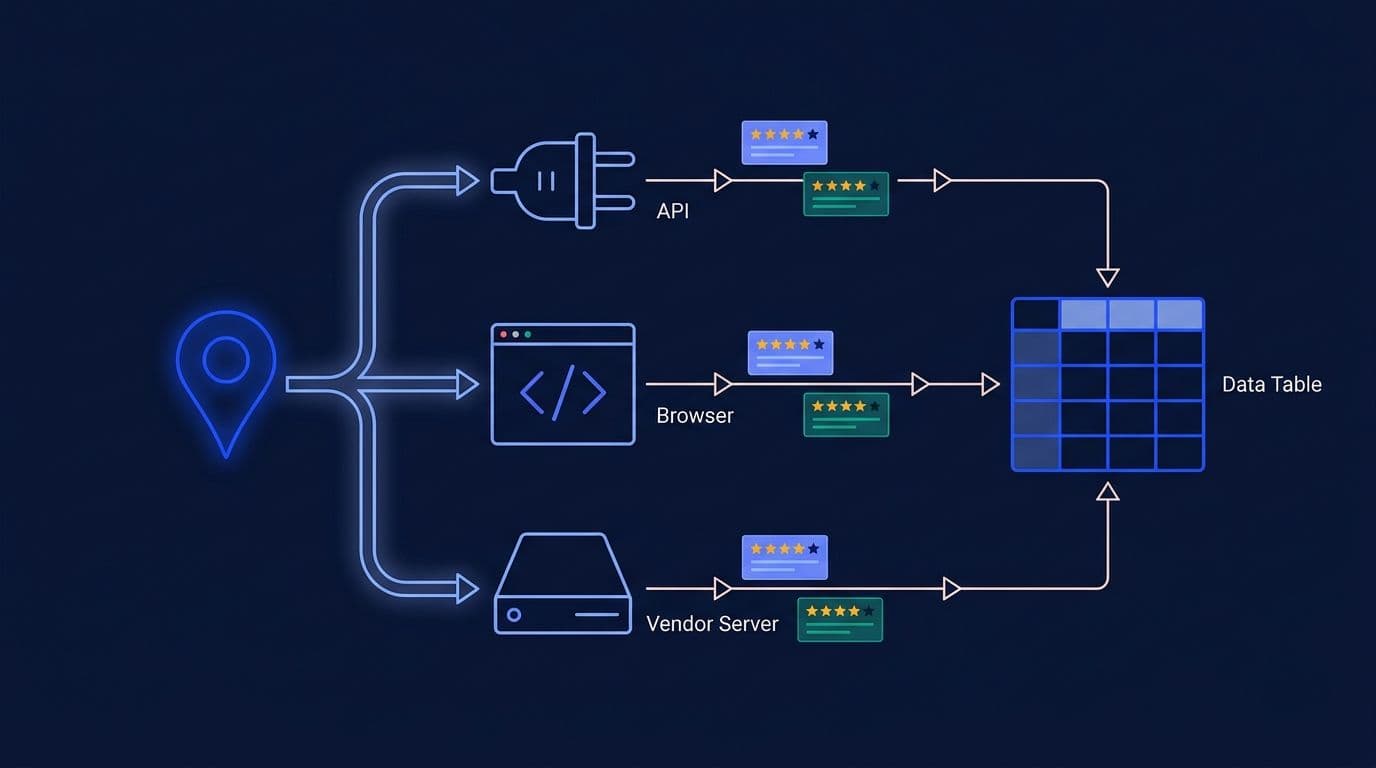
If you need review text, ratings, timestamps, and reviewer identities out of Google Maps at any real volume, you have four practical paths. A general-purpose scraping API that renders and parses Maps pages is one. The official Google Places API is another. A self-hosted browser automation stack is a third option. A prebuilt scraper from a marketplace rounds out the list.
This guide compares those options honestly, including where ours fits and where it doesn't. We'll also cover parts nobody writes about. That means how to scrape Google Maps reviews past the point where pagination quietly stops, how to spot coordinated fake review campaigns from reviewer profiles, and how to keep per-city costs flat when you expand from one metro to forty.
The short answer: pick by volume, freshness, and what you do next
Three questions decide this for you.
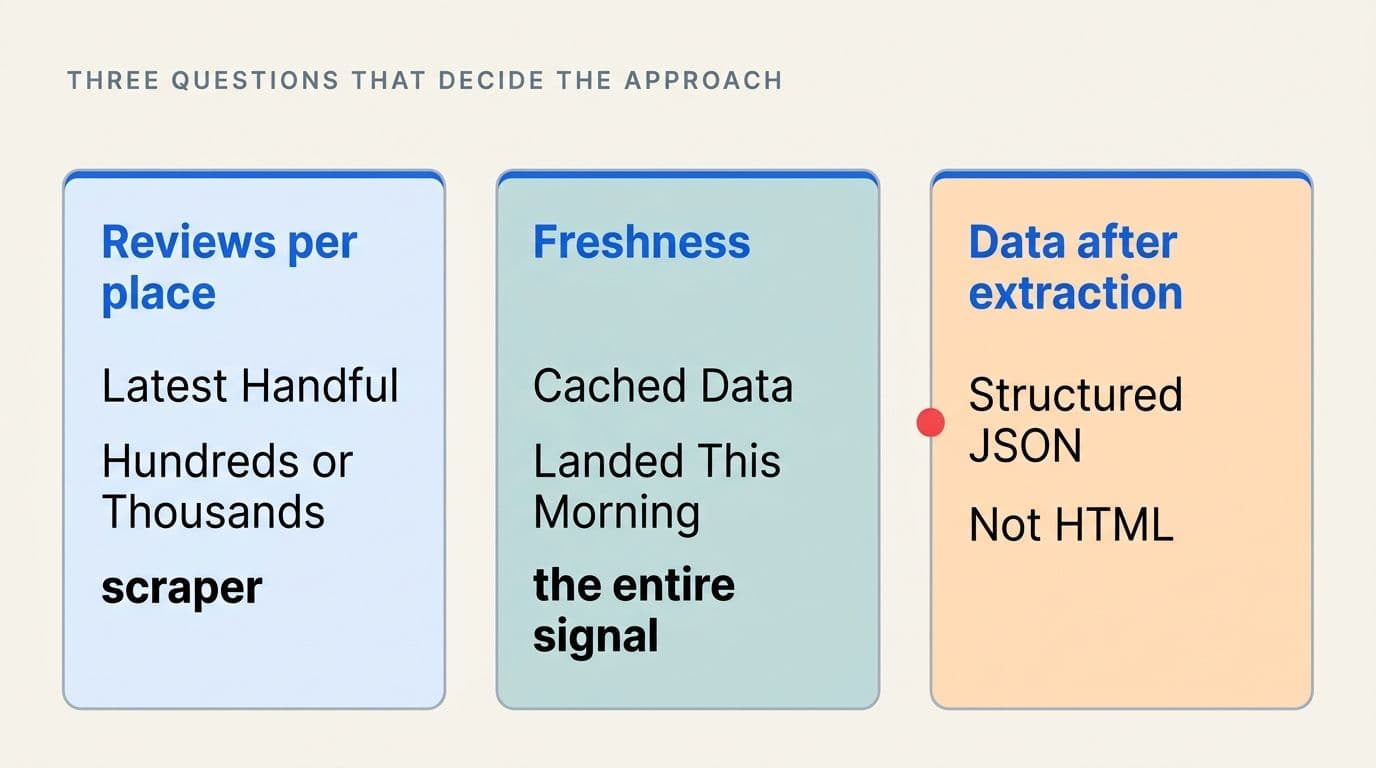
How many reviews per place? If you need the latest handful for a dashboard tile, the authorized API is fine and you should stop reading. If you need hundreds or thousands per place for sentiment modeling, trust and safety work, or competitive analysis, you need a scraper.
How fresh does it need to be? Reputation monitoring and lead scoring both die on cached data. A review that landed this morning is the entire signal.
What happens to the data after extraction? If reviews feed a CRM or an alerting system, you want structured JSON on the way out, not HTML you parse twice. That single decision eliminates about half the tooling on the market.
Most teams we talk to land on a hosted scraping API for the extraction layer, then own the enrichment and scoring logic themselves. That split keeps the fragile part, rendering, proxies, parsing, outside your codebase, while the valuable part stays inside it.
The options, compared honestly
Below is what each approach actually gets you, in the order we'd evaluate them. We run one of these, so read the first entry with that in mind. The limits listed for it are real ones, not softened.
1. DataBlue: Extract API plus Google SERP API
Our Map API and Extract API handle Maps pages as rendered pages, not as a bespoke Maps product. You point the Extract API at a place URL and get clean markdown or structured JSON back, with JS rendering and proxy handling already done. For discovery, finding the places to scrape in the first place, the Google SERP API returns live local results as structured data.
That architecture matters for one reason worth saying plainly. Maps and news results come out better through a general scraping API than through a SERP-only tool. Search-only endpoints are built around the organic results block, and Maps panes are a different rendering problem. Teams that try to force Maps through a search endpoint usually end up with partial panels and missing review bodies.
What you get: live scraping on every request with no cached layer, LLM-ready output so review text arrives usable, and visible endpoint weights before each run. Failed requests that return no data don't cost a credit. Top-up credits never expire. Self-serve signup, no minimums, no annual contract. We built this for teams who need a Google Maps reviews API they can trust without a sales call.
What you don't get: a turnkey "reviews" button. You compose the pipeline yourself, wiring up discovery, place URLs, extraction, and parsing into your schema. If you want a one-click Google Maps review scraper with a UI, this isn't that.
2. The sanctioned Google Places API
This is the legitimate, Terms-friendly route. You get place details, ratings, and a small fixed sample of reviews per place, a handful, not the history. It's stable, it's documented, and it will never surprise you with a layout change.
It will surprise you with its ceiling. If your product needs review volume over time, reviewer identities at scale, or anything resembling a full corpus, the official endpoint can't supply it. No amount of quota buys your way past the per-place cap. Pricing is per request and climbs fast across large place sets, which is why teams running city-wide sweeps tend to outgrow it quickly.
Use it as a system of record for place metadata, the kind of static facts like IDs, categories, hours, and coordinates, and pair it with a scraper for the review corpus. We wrote a full breakdown of that tradeoff in our Google Places API alternative comparison, including where staying on the official API is still the right call.
3. Build your own Google Maps review scraper
The stack is familiar: Playwright or Puppeteer, a headless Chromium instance, a proxy pool, and a scroll handler for the review pane.

The maintenance is the cost. Maps changes its DOM without warning, the review pane uses virtualized scrolling that drops nodes as you go, and the session heuristics that trigger soft blocks shift constantly. You're also buying residential proxies separately, which is where the real spend lands. Budget for someone owning this part-time, forever.
Build it when Maps extraction is your core product and you need control over every request. Buy it when Maps data is an input to your actual product.
4. Marketplace scrapers and prebuilt actors
These are fast to start, genuinely worthwhile for one-off pulls, and priced per result. That's the workflow complaint we hear most. People want the reviews step to consume the places step automatically, and it frequently doesn't.
When the handoff is automated, the payoff is real. The open question is whether the tool composes into your stack or only into its own dashboard.
What good Google Maps reviews JSON actually contains
Before you pick a tool, decide what fields you need. That determines whether a given output is usable or just technically present.
The baseline for any Google Maps reviews data extraction job:
- Review text, full, not truncated at an ellipsis
- Star rating, as a number
- Absolute timestamp, not "3 months ago"
- Reviewer display name and profile URL
- Reviewer's total review count and local guide status
- Owner response text and its timestamp
- Place identifier that ties the review back to a business row
- Any photos attached to the review
Relative timestamps are the field people underestimate. "A year ago" is useless for cohort analysis and worse for alerting. You cannot tell whether two scrapes contain the same review or two different ones. If your Google Maps reviews JSON arrives with relative dates only, you need a resolution step before anything downstream touches it, and that step gets expensive at scale.
The reviewer profile link is the second field teams skip and regret. It's the entry point for every fraud detection technique later in this article. Capture it on the first pass even if you have no use for it yet. Backfilling reviewer identities across a corpus you already collected means rescraping the whole thing.
Owner responses are worth keeping for a different reason. Response rate and response latency are strong signals of an actively managed business. For lead research, a listing where the owner replies to reviews within days is a different prospect than one where nobody has replied in two years.
Working around the 3,000+ review limit when you scrape Google Maps reviews
Here's the wall everyone hits eventually. Pages with very large review counts don't paginate forever. Somewhere past a few thousand reviews, the loading behavior degrades and you stop getting new records no matter how long you scroll. For an airport, a stadium, or a flagship retail location, it's the first thing you hit.
There's no clean trick that unlocks the full history. What works is accepting the cap and designing around it.
Sort by newest before you start. This is the single highest-value change. Default sort ordering mixes relevance signals in, so two runs against the same place can return overlapping-but-different sets, and your deduplication logic ends up doing work it shouldn't have to. Sorting by newest makes each run deterministic at the top and gives you a stable boundary. Everything above the newest review you already stored is new, and everything below it you've seen.
Then treat the corpus as incremental rather than complete. Scrape once to establish a baseline, then re-scrape on a schedule and merge only the records above your watermark. Over a few months of runs you accumulate far more history than any single pull could return, and you never fight the cap again because each run only needs to reach back to your last timestamp.
For the historical tail below the ceiling, use the rating filters as a partitioning strategy. Pulling one-star reviews and five-star reviews as separate passes gives you two smaller result sets, each of which fits under the loading limit more comfortably than one undifferentiated stream. You won't get perfect coverage of the middle, but for sentiment work the extremes carry most of the signal anyway.
The honest summary: full historical capture of a mega-listing is not reliably achievable. Scope the product promise accordingly before a customer asks for it.
Handling CAPTCHAs and soft blocks with proxy rotation
Hard CAPTCHAs are the visible failure. Soft blocks are the one that costs you money, because the request returns a 200 and a page that looks almost right with the review pane empty. If your pipeline doesn't validate output shape, you'll write thousands of empty rows and only notice when someone asks why a chain's reviews flatlined.
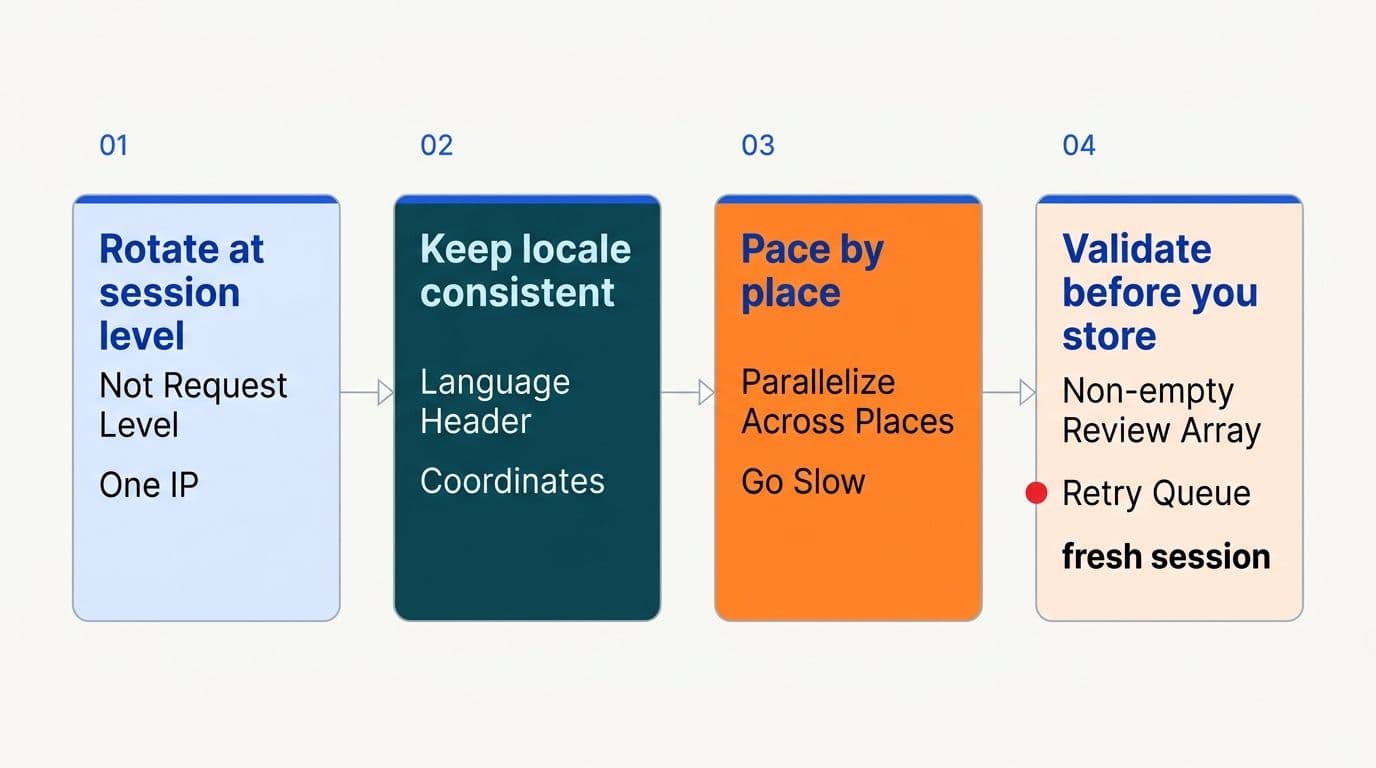
Four things keep block rates manageable:
Rotate at the session level, not the request level. Maps assigns state to a browsing session. Swapping IP mid-session between a place page load and its review scroll is a stronger anomaly signal than keeping one IP for the whole sequence.
Keep locale consistent across the stack. If the proxy exits in Toronto, the language header, the coordinates in the request, and the result set should all agree.
Pace by place, not by total throughput. Parallelize across the place dimension and go slow within any single listing.
Validate before you store. Assert that the review array is non-empty when the place reports a non-zero review count, that ratings fall in range, and that timestamps parse. Route failures to a retry queue with a fresh session instead of into your database.
A hosted Google Maps reviews API should absorb most of this for you, handling the proxy pools, rendering, and retries so you don't have to. We do, and we don't charge a credit when a request returns no data, which matters specifically because soft blocks are the failure mode you can't predict. What no provider can honestly promise is that every request gets through every time. Anyone who tells you otherwise is selling you a number they can't back.
Maps-only tools vs multi-source scraping APIs
A maps-only scraper is purpose-built. It knows the review pane, it knows the pagination, it probably handles sorting for you. If your entire job is to scrape business reviews from Google Maps and nothing else, that specialization is worth something.
It stops being worth something the moment the job grows a second source, and it always grows a second source. Reputation products need Maps plus the business's own site plus whatever review aggregator covers their vertical. Running four vendors for four sources means four auth schemes, four rate-limit models, and four output formats to normalize.
A multi-source platform trades a little Maps-specific polish for one credential, one response shape, and one place to debug. Our Extract API and Google SERP API share a schema, so review text and search results land in the same structure and your parsing layer is written once.
The honest version of this comparison: if you need a full proxy and unblocker product line, residential IP management as a service, and prepackaged datasets, we don't replace that. We cover the scraping and SERP piece well and we don't pretend to cover the rest.
Detecting fake reviews through reviewer profile analysis
This is where review scraping stops being a data problem and starts being an investigation. Place-level reviews tell you what was said. Reviewer-level data tells you whether to believe it.

Start with the profile fan-out. For every reviewer in your corpus, scrape their public profile and collect the full list of places they've reviewed, with dates. Most legitimate reviewers have a long, geographically coherent, temporally scattered history. Fraud accounts have a short burst across unrelated businesses, often clustered within days.
Then use the geography. Reviews carry location context, and the coordinates attached to a reviewer's history let you estimate their home region. A reviewer whose history centers on one metro who suddenly reviews four businesses in a different state within one week is a flag. A cluster of reviewers who all show the same incoherent geographic spread, posting to the same set of businesses, is a coordinated campaign. It becomes visible only when you have the full reviewer graph, not distinct listings.
Count reviews per place per day. Organic review flow is lumpy but rarely spikes to ten five-star reviews in six hours on a listing that normally gets two a month.
Account overlap matters too. Build the bipartite graph of reviewers and places. Legitimate overlap between any two unrelated businesses is low, so pairs of businesses sharing a dozen reviewers are either franchise locations or buying from the same vendor.
Text homogeneity is another tell. Run embeddings over review bodies and cluster them. Purchased reviews cluster tightly because they come from the same prompt or the same template.
None of this works without reviewer URLs captured during the original pull, which is why we put that field in the must-have list. Trust and safety teams consistently need profile-level and historical data, not just the reviews attached to a single place. That requirement reshapes the whole extraction design.
Filtering by review recency and business quality
For lead generation, the review corpus is a qualification filter before it's anything else.
Recency is the strongest signal available. A listing whose most recent review is two years old is usually a dead business or one that doesn't care about its online presence. Filtering to businesses with reviews inside a recent window, a few months, depending on vertical, removes a large share of junk from a city sweep before a human ever looks at the list.
Review count works as a second axis, and it's two-sided: too few reviews and the business is either new or inactive, while an unusually high count with a flat rating curve deserves its own look.
Beyond count and recency, three derived fields earn their place in the scoring model: review velocity, meaning reviews per month over the trailing year. Owner response rate. And rating trajectory. Compute these at ingestion and store them on the business row.
Integrating scraped maps data with enrichment sources
Maps gives you the local footprint: name, category, address, coordinates, phone, website, rating, review history. It doesn't give you headcount, tech stack, funding, or the decision maker's email. Enrichment closes that gap, and the website field is the join key.
The practical sequence runs like this. Extract the place record, take the website URL, run it through a Lead Enrichment API to get firmographic structure back, and merge on the place ID. Our Lead Enrichment API turns a company URL into structured JSON for exactly this handoff, so the output lands in the same shape as the rest of your pipeline rather than requiring a second parser.
Two traps to avoid. First, normalize domains aggressively before enriching. Maps listings carry tracking parameters, redirect shorteners, and the occasional Facebook page in the website slot. Enriching a Facebook URL wastes a call and returns nothing useful. Second, cache enrichment results separately from review data on different refresh cycles, since reviews change weekly while firmographic data doesn't.
For multi-location brands, resolve chains before enrichment. Forty Maps listings for the same franchise should produce one enriched company record with forty location rows attached, not forty duplicate enrichment calls. Match on normalized domain plus brand name, then reconcile by hand on the ambiguous remainder.
If you're building the discovery half of this pipeline from scratch, our guide on how to extract location data from Google Maps walks through place-level extraction in detail, which is the layer this enrichment step sits on top of.
Automating lead follow-up and tracking
Once review data is scored and enriched, the thing that determines whether any of it produces revenue is whether the state transitions are automated.
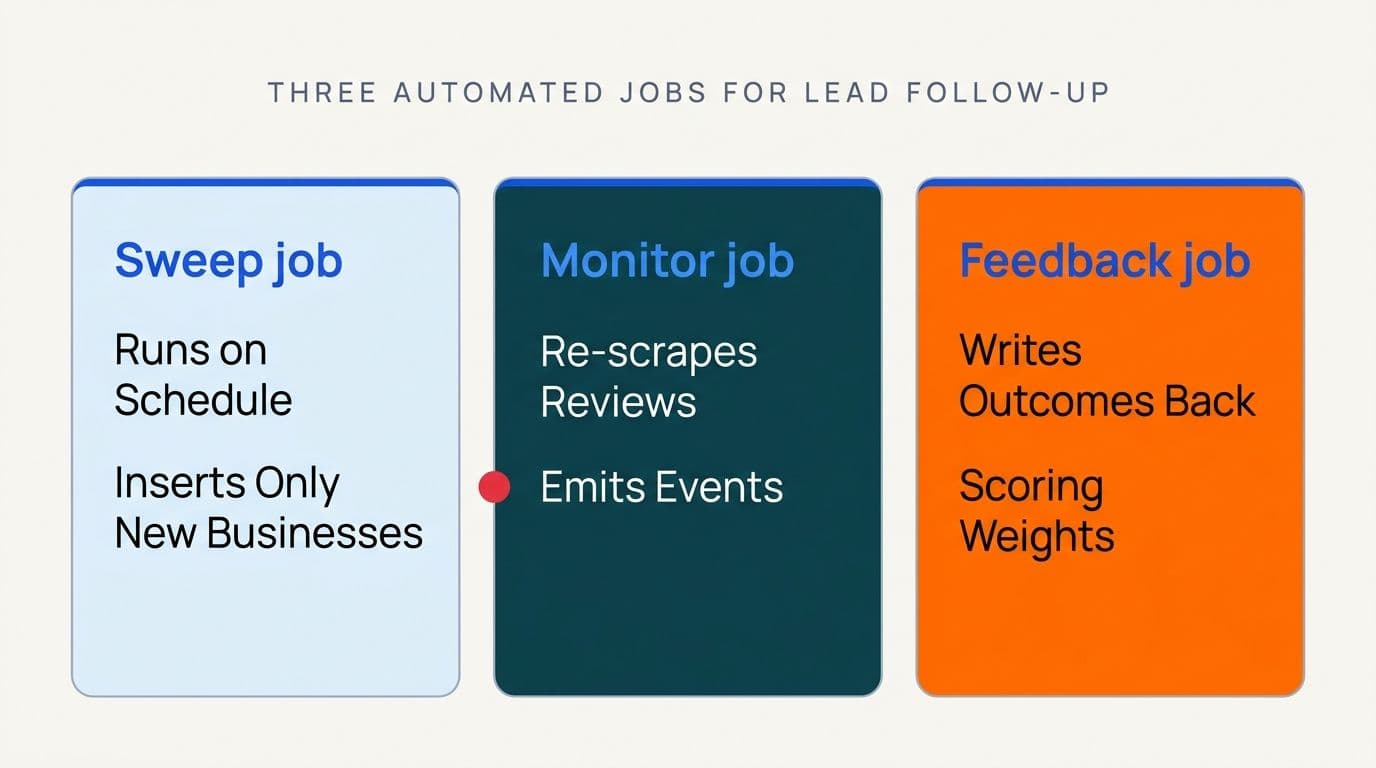
Three jobs cover most of it.
The sweep job runs on a schedule against your target geographies and categories. It extracts place records plus recent reviews, applies your recency and quality filters, and inserts only businesses that pass and aren't already in the CRM. Idempotency here is non-negotiable. A sweep that duplicates existing accounts will get your pipeline turned off by the sales team within a week.
The monitor job re-scrapes reviews for businesses already in the CRM and emits events. These include a rating dropping below threshold, a negative review posted, velocity spiking, or an owner who stopped responding. Each event maps to a play. A new one-star review on an account your rep is working is a reason to call today, and the only thing standing between you and that call is whether the monitor runs often enough.
The feedback job writes outcomes back: which filters produced closed deals, which review-count band converted. Feed that into the scoring weights so each sweep is better qualified than the last.
Keep a per-business record of last scraped, last contacted, and last event. Without it you will re-contact dead accounts and re-scrape places you touched yesterday. The step where you bulk scrape Google reviews and it looked cheap becomes a recurring tax on work you already did.
Cost-effective scaling for multi-city campaigns
Going from one city to forty is where naive pipelines fall apart, because cost grows with places times review depth times refresh frequency, and all three multiply.
Tier your refresh rates. Not every business needs weekly monitoring. Active pipeline accounts get regular checks, while the long tail gets checked monthly or quarterly. This single change is usually the largest cost reduction available, and it costs you nothing in signal quality because dormant listings don't generate new reviews anyway.
Cap depth per place. For scoring purposes you rarely need more than the recent window. Pull deep once at baseline, then only the new reviews above your watermark. Combined with newest-first sorting, each incremental run gets cheap.
Stage your filters. Run the discovery pass first, apply recency and review-count filters on the place metadata, and only then scrape reviews for the survivors. Scraping full review histories for businesses you're about to discard is the most common waste pattern we see in city sweeps.
Credit-based pricing is only better if the weights are visible before you run, which is why we publish endpoint weights up front and don't apply hidden multipliers. Plans run from $29/mo for 40,000 credits to $299/mo for 1,150,000, monthly credits reset each period, and top-up credits never expire, so a seasonal campaign doesn't torch a balance you bought in advance.
Honest limits before you commit
Things worth knowing before you build on us.
We don't have SOC 2 Type II or ISO 27001 yet. Both are on the roadmap. If your procurement process requires a current certificate today, that's a real blocker and we'd rather you hear it now.
Support is Slack, with a fast first response on priority issues. There's no named CSM and no 24/7 phone line. For most engineering teams a fast Slack thread beats a ticket queue, but for enterprises that mandate a phone escalation path, it won't.
SERP coverage spans 100+ countries with city, language, and device localization, not all 195+. Dense micro-locale targeting in smaller markets can come back thin. Test your specific geography before you plan around it.
We cover scraping and SERP. We're not a full proxy, unblocker, and dataset product line, and we don't claim block-free scraping or CAPTCHA bypass in every case. Some requests fail, and those don't cost you a credit.
Migration takes a session, not a sprint. The Firecrawl-compatible response schema removes most output mapping, but you still own re-testing your parsers.
Legality is the final point worth flagging. Scraping public review content is not automatically permissible regardless of a site's Terms of Service, and data protection obligations vary by jurisdiction. Reviewer names and profile links are personal data in multiple of them. Get your own counsel's read before you operationalize reviewer-level analysis.
Start building
If you want to scrape Google Maps reviews without owning a browser farm, the fastest test is a real one against your own target cities. Signup is self-serve with 1,000 one-time credits free and no credit card, which is enough to run a city sweep end to end and see whether the output shape fits your pipeline.
- Start Free. 1,000 credits, no card
- Get Your API Key
- Read the Docs
- See Pricing
- Compare My Provider
- Book a 30-min demo