

How to Scrape Amazon A+ Content: A Developer's Guide
If you need to scrape Amazon A+ Content, the short answer is this. A+ modules are not part of the standard product payload. They live in a separate, brand-authored block on the detail page, usually under "From the manufacturer." Most product scrapers skip them entirely. To capture them you need a renderer that executes the page, a parser that reads module containers rather than fixed CSS paths, and an output schema that keeps module type, copy, image URLs, and comparison chart rows distinct from the title, bullets, and description.
That's the whole job. The rest of this guide covers what each module contains, why DIY scrapers break on them, and how to handle comparison charts and image specs. It also covers what the content actually does for conversion, by category.
What You Get When You Scrape Amazon A+ Content
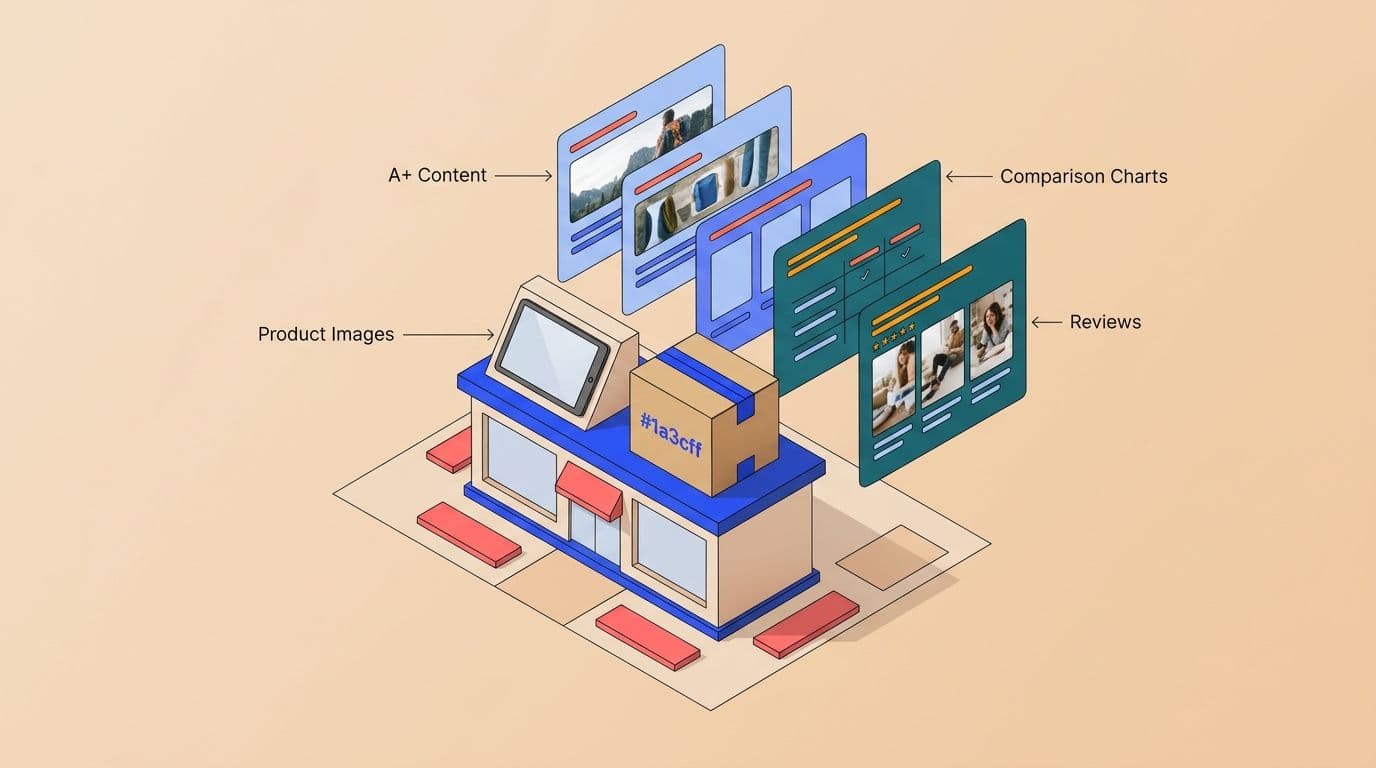
A+ Content (still widely called EBC, Enhanced Brand Content) is a set of drag-and-drop modules a brand owner assembles in Seller Central or Vendor Central. On the rendered page they show up as a stack of image-and-text blocks below the fold, above or below reviews depending on the category and the page variant you got served.
The module types you'll hit most often:
- Standard image with text overlay. A banner, sometimes with copy baked into the image file
- Four-image / three-image text blocks. The workhorse feature grid
- Standard comparison chart. A table of the brand's own ASINs with attribute rows
- Image header with text. The hero block at the top of the A+ stack
- Premium A+ modules. Video loops, hotspot images, interactive carousels, available to brands that qualify
A solid extraction job, the kind this guide is built around, needs to capture, per module, the module type, its position in the stack, any heading text, body copy, and every image URL served. Amazon serves several resolutions from the same asset, so for charts, capture the full grid including linked ASINs. Keep that individual from the A-grade listing fields. A+ copy is marketing prose written by the brand, while bullets and the description are a different content layer with different rules, and merging them wrecks downstream analysis.
One practical note: a lot of pages have no A+ block at all. Your extractor should treat absence as a valid, recorded state, not a failure.
Why A+ Content Breaks DIY Scrapers Faster Than Anything Else
The pattern we see repeatedly is that a hand-rolled Amazon A+ Content scraper works beautifully for a few weeks, then it starts returning empty arrays. Amazon updates detail page structure regularly, and A+ containers get renamed, re-nested, or swapped for a new layout variant without any announcement. CSS selectors that targeted a specific class chain snap. Nothing throws an error. You just get silent nulls that pollute your dataset until someone notices the module counts dropped.

Three things make A+ worse than the rest of the page:
- It's injected, not inline. Much of the A+ block arrives after the initial HTML, so a plain HTTP fetch gets you a stub. You need JS rendering, which means headless browsers, which means infrastructure.
- Layouts aren't consistent across categories. The same module type can be wrapped in different container structures depending on the product category, so a selector that works for one subcategory silently fails on the next.
- Images are lazy-loaded. The real asset URLs often sit in data attributes or load on scroll, so a naive
img srcgrab returns placeholders.
Add proxies, CAPTCHAs, and rate shaping on top, and the maintenance load is permanent. That's the honest trade-off. Building an Amazon A+ Content scraper in-house is a few days of work and then an open-ended support ticket against a site that changes faster than your sprint cadence.
How to Extract Amazon EBC Content Without Maintaining Selectors
The approach that holds up is to stop writing selectors and start describing the output you want. Point an extraction API at the product URL, let it render the page, and ask for either clean markdown or a structured JSON object that matches a schema you define. When Amazon reshuffles its class names, the schema still describes "a stack of modules with headings, copy, and images," and that stays true after the redesign.
This is what our Extract API is built for: scrape any URL into LLM-ready markdown or validated JSON, with the DOM noise stripped out before it reaches your pipeline. For A+ specifically, markdown gives you the copy in reading order, which is what you want if the data is headed for a RAG index or a competitive-positioning summary. Structured JSON gives you the module-level fields you need for a catalog database instead.
A few things that matter when you extract Amazon EBC content at scale:
- Render every request live. Cached detail pages are useless for A+ audits, because the whole point is catching when a competitor republishes their modules. Every DataBlue request scrapes live. There's no stale cache layer in front of it.
- Validate the schema. Strict JSON schemas beat brittle selectors. If a module is missing, you want a typed null, not a shifted array.
Here is the shape worth normalizing to, regardless of which tool produces it. Example, this is an illustrative target schema, not a vendor response format:
{ "asin": "EXAMPLE_ASIN", "has_aplus": true, "modules": [ { "position": 1, "type": "image_header_with_text", "heading": "Built for daily carry", "body": "Water-resistant shell, YKK zips...", "images": [ { "url": "https://example.com/asset-970.jpg", "alt": "backpack on trail" } ] } ], "comparison_chart": { "asins": [], "rows": [] }}Run that against a hundred competitor ASINs and you have a module inventory you can diff week over week.
Amazon Comparison Chart Scraping Is the Highest-Value Module
If you only parse one module, parse this one. Amazon comparison chart scraping gives you something no other part of the page does: the brand's own view of its product ladder, in its own words.

The standard comparison chart is a table. Columns are ASINs the brand chose to show side by side. Rows are the attributes the brand decided are the deciding factors. That's a curated competitive set and a curated feature hierarchy, published voluntarily. When you extract it, capture:
- Every ASIN in the chart, including the one you're scraping (it's usually highlighted)
- The attribute row labels in order. The top rows are the brand's stated purchase drivers
- Cell values as raw strings, since brands mix checkmarks, numbers, and prose in the same column
- Image thumbnails per column, which are frequently different crops than the main listing images
Two analyses fall out of this almost for free: a ranked list of the attributes brands in your category treat as top-tier purchase drivers, and a map of which ASINs get repeatedly chosen as the competitive set worth naming. Together they form a far better feature-priority signal than scraping bullet points, because charts force brands to commit to a comparison.
The chart is structurally different from text-and-image modules. Jamming it into the same object shape loses the grid.
Image Specs, Blurriness, and Why You Should Scrape Amazon Product Images and Modules Together
Image quality is where A+ content quietly fails. Amazon publishes exact dimension requirements per module slot. Assets that don't match get rescaled, which produces soft, blurry banners that undercut the premium feel the module was supposed to create.
That's a strong argument to scrape Amazon product images and modules in the same pass rather than treating images as an afterthought. Once you have the asset URLs, you can fetch headers or the files themselves and record native dimensions per module slot. Compare native size against the slot's expected size and you have a mechanical blurriness audit across an entire brand's catalog, yours or a competitor's.
Two more things to record while you're in there:
Embedded text. Plenty of brands bake their copy into the image rather than using text boxes. It looks tidier and it's faster to produce, but text rendered inside a JPEG isn't text anyone's parser can read, not yours, not Amazon's, not an AI shopping assistant's. If you're auditing listings, flag modules where the text fields are empty but the images are large. That's usually copy hiding in pixels. If you're the brand, keep real text in the text slots and treat image typography as reinforcement, not replacement.
Alt text. It's often blank. When it isn't, it tells you how seriously the brand treats accessibility and machine readability, which correlates with how carefully the rest of the listing was built.
When you scrape Amazon product images and modules together, the output doubles as a QA harness.
Does A+ Content Actually Convert? ROI by Category
Amazon's own marketing materials claim A+ Content can lift sales, sometimes citing figures as high as 20%, though Amazon doesn't publish the underlying methodology behind that number. Take that as the ceiling claim from the party selling the feature. What we observe in the field is harder to pin to a single number: conversion gains vary widely by category, module quality, and how weak the baseline listing was to begin with, but a lift is the typical outcome once a shopper is already on the page.
The critical qualifier: A+ does not help discoverability. It doesn't get you ranked, it doesn't feed the indexed text the search algorithm weighs most heavily, and it won't rescue an ASIN nobody is clicking on. It's a closing tool, not an acquisition tool. If your sessions are flat, A+ work is the wrong project.
The other half of the value is positional. A+ gives a brand owned real estate on its own detail page, space that would otherwise be available to competitor ad placements. That space is worth something independent of the conversion math, because every pixel you occupy is a pixel a rival can't buy.
If you want to measure any of this properly, the conversion signal has to be paired with demand and sentiment data. Module changes rarely explain movement on their own. We cover the review side of that pipeline in our guide on how to scrape Amazon reviews, which is where the "why did conversion shift" answers usually live.
Books: Where A+ Content Earns Its Keep, and Where It Doesn't
Books are the category where the ROI question gets genuinely murky, and authors are right to be skeptical.

What does seem to separate book A+ that works from book A+ that doesn't is whether it adds assets the page doesn't already have. Restating the plot is wasted space, since the product description already did that, and a shopper who scrolled past it isn't going to read it again in a nicer font. What earns attention is material that exists nowhere else on the page: character art, a world map, a series banner, a pull quote set in the book's typography, mood imagery that signals genre in half a second.
For fiction in particular, atmosphere beats information. The purchase decision is emotional and fast. Your modules should set tone, not summarize. For nonfiction, the opposite tilt works, a chapter breakdown, an author credential block, a comparison chart against the author's other titles.
If the budget only covers generated art, ship no A+ content instead.
Why Amazon's Own Brands Ship Thin A+ Content
It's a confusing benchmark if you're using it as a quality bar.
The explanation is structural, not strategic. Amazon's private label lines run on volume and price position, with enormous SKU counts and rapid catalog churn. Hand-designing six polished modules for a two-dollar cable that may be delisted next quarter doesn't pay. Those products also win on search placement and price, not on persuasion. The shopper arriving at an Amazon Basics page has usually already decided on the cheap option.
So don't benchmark against them. Benchmark against the strongest independent brand in your subcategory, which is exactly what Amazon A+ content data extraction across a competitor set is for.
Rank competitors by module count, image quality, and chart presence, and you'll find the real bar quickly.
How A+ Content Changes Page Layout and Buries Reviews
Here's a side effect that rarely makes it into A+ guides. A long module stack pushes everything below it further down the page. On mobile, that frequently means the review section, the thing a sizable share of shoppers scroll directly toward, sits behind several screens of brand marketing.

For products with strong social proof, that's a self-inflicted wound. You've placed your own content between the shopper and the asset most likely to close them. For products with weak or sparse reviews, the same layout effect works in your favor, giving you more controlled surface before the shopper reaches thin feedback.
The decision is empirical, and scraping makes it measurable. Record module count and total A+ pixel height alongside review count and average rating across your category. An Amazon enhanced brand content API that returns module position lets you compute stack length as a plain integer per ASIN, which makes this a five-minute query instead of a manual survey.
Validate the Strategy Before You Pay for Design
Design is the expensive part, so validate first. A workable sequence:
Pull the contested set. Scrape the top organic ASINs for your target keywords, then run Amazon A+ content data extraction across all of them.
Categorize what exists. Which module types dominate? Do the leaders use comparison charts? How much copy are they running? Where do they place their chart in the stack? Patterns show up fast at thirty ASINs and are obvious at a hundred.
Find the gaps. If every competitor runs four feature blocks and nobody runs a comparison chart, that's your opening, and comparison charts are cheap to produce because they're mostly text.
Test on a subset. Publish modules on a handful of ASINs, hold others back, and watch conversion on both groups over a full sales cycle. Keep ad spend and price stable while you do it. Skipping the hold-out group is how teams end up attributing a seasonal lift to their new banners.
Re-scrape on a schedule. Competitor modules change. Weekly or monthly jobs on the same ASIN list tell you who refreshed and what they changed, the closest thing to a changelog for your category's positioning.
Most of that is a few hundred rendered pages. On our plans, which start at $29/mo for 40,000 credits, a validation sweep like this is a rounding error against a single designer invoice.
Designer vs. DIY: Costs, Hiring, and Portfolio Checks
Once you've validated, you have three production routes.

Templates in a tool like Canva. Cheapest and fastest, fine for text-forward modules and comparison charts. The risk is dimension mismatch. Exporting at a convenient size instead of the module's exact spec is precisely what produces the blurry output discussed above.
A specialist A+ designer. The people worth hiring are the ones who do Amazon work specifically, found through Amazon-focused freelance marketplaces, agency referrals, and seller communities.
In-house, if you already have a designer. Workable, provided someone owns the spec sheet.
When evaluating a portfolio, look past the mockups. Ask for live ASINs and open them on a phone. That's where rescaling artifacts and unreadable embedded type show up. Check whether the comparison charts in their work are populated with real attribute rows or filler. A designer who can't answer that last question hasn't thought about how the page is parsed, by Amazon or by anyone else.
Scaling From One ASIN to a Full Catalog
Single-page extraction is a demo, while catalogs are the real workload. For a few thousand ASINs, queue product URLs against the Extract API with a defined schema and store results keyed by ASIN and scrape date.
For discovery, finding which ASINs to scrape, our Google SERP API returns live results across 100+ countries, localized by city and language, which is how you build a competitor list that reflects the market you actually sell in rather than a US default.
Two caveats worth stating plainly. Scraping legality depends on the target site's terms and the jurisdiction you operate in, so check before you run production jobs at volume. And rate limits aren't just a courtesy, hammering a target too hard is how your infrastructure ends up blocked before you've collected anything useful.
If you're wiring up the broader catalog pipeline, pricing, variants, bullets, availability, start with our main guide on how to scrape Amazon product data and add the A+ layer on top.
Ready to pull your first module stack? Start free with 1,000 signup credits, no credit card.
Frequently Asked Questions
Why do DIY Amazon scrapers break when scraping A+ content?
A+ content breaks DIY scrapers because it's injected after the initial HTML requiring JavaScript rendering, layouts aren't consistent across product categories, and images are lazy-loaded with real URLs in data attributes. When Amazon updates detail page structure and renames or re-nests A+ containers, CSS selectors snap silently, returning empty arrays without throwing errors.
What are the main types of Amazon A+ content modules?
The main A+ module types include standard images with text overlay, four-image or three-image text blocks, standard comparison charts, image headers with text, and premium A+ modules like video loops and interactive carousels available to qualifying brands.
What should you capture when scraping Amazon comparison charts?
When scraping comparison charts, capture every ASIN in the chart, attribute row labels in order, cell values as raw strings, and image thumbnails per column. The rows at the top represent the brand's stated purchase drivers, and the chart shows the brand's curated competitive set and feature hierarchy.
Does Amazon A+ content help with product search rankings?
A+ content does not help with discoverability or search rankings. It's a closing tool for shoppers already on the page, not an acquisition tool, and it won't improve ranking if sessions are flat or the ASIN isn't being clicked on.
What type of A+ content works best for books on Amazon?
For books, A+ content works best when it adds assets the page doesn't already have, like character art, world maps, or series banners. For fiction, atmosphere and tone-setting modules perform better than information, while for nonfiction, chapter breakdowns and author credentials work well.