

Google does not publish a public Google Flights API. What it publishes is a web app that renders itineraries, fares, and filters through a heavily obfuscated front end. So when developers go looking for a google flights api, what they actually need is an endpoint that runs the search live, parses the result, and hands back clean JSON they can drop into a pricing model, a travel agent app, or a fare-alert product.
That is what DataBlue sells. You send an origin, destination, dates, and the usual search parameters, and we run the search in real time against Google and return structured results. Carriers, stops, durations, layovers, prices, and booking links arrive as JSON your code can read without a single CSS selector. No stale cache sits between you and the fare. Pricing is credit-based with the weight of each endpoint visible before you run it, and you start with 1,000 free credits without a card. Get your API key and the first search takes about five minutes.
What a Google Flights API actually returns
A raw Google Flights page is a JavaScript-rendered mess of nested arrays. A usable google flights data api flattens that into fields with names. Departure and arrival times with airport codes, airline and operating carrier, flight numbers, total duration, number of stops, layover airports and durations, cabin class, baggage hints where Google exposes them, and the price with its currency all come through clean. You also get the grouped structure Google itself uses, with best-value results sitting apart from the cheaper, more awkward options, so you mirror its ranking or sort your own way instead.
The practical difference between this and a general-purpose scraper is schema stability. If you write your own google flights scraper against the rendered DOM, every front-end change Google ships breaks your parser, usually silently, usually on a weekend. A maintained flight price api absorbs that churn on our side, and you get the same field names today and after the next layout change. If a field genuinely disappears from Google's output, it comes back null rather than shifting every index in the array.
Output format matters more than most buyers expect. Say the flight data feeds an LLM, a trip-planning agent, or a chat interface answering a question about the cheapest way to reach Lisbon in March. Raw HTML burns tokens for nothing in that case, and everything we return is LLM-ready by default. Compact JSON serves programmatic use, and markdown gives you a human-readable block to pass straight into a prompt. That is the same design that runs through our Extract API and Google SERP API, and the flight search API JSON follows the same conventions, so one integration pattern covers all of them.
Google Flights API pricing: credits, weights, and what a search costs
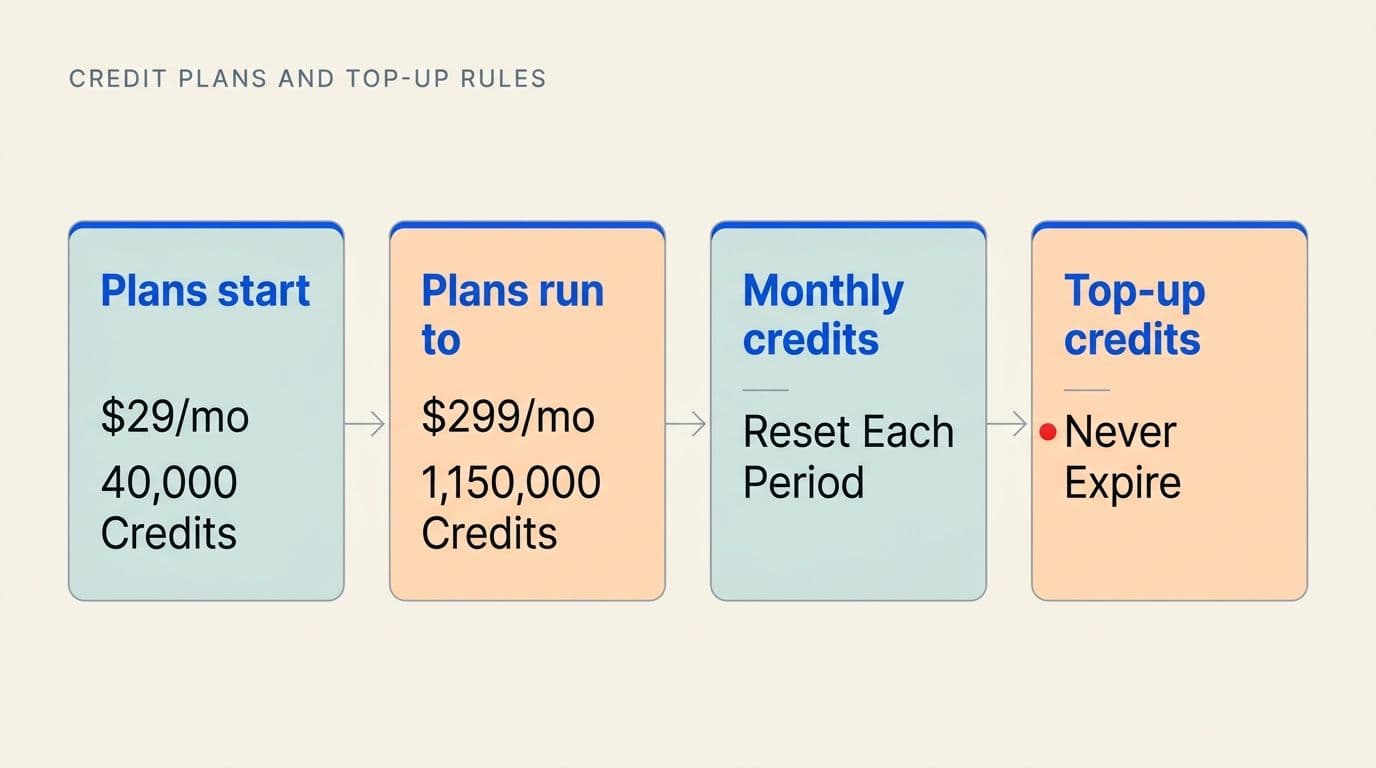
Everything on DataBlue runs on one credit pool. Plans start at $29/mo for 40,000 credits and run to $299/mo for 1,150,000 credits, with top-ups available at any tier. Monthly credits reset each period, but top-up credits never expire. Buy a block for a seasonal fare-tracking project and use only half, and the rest is still there next quarter.
Two things about google flights api pricing got built on purpose. First, every endpoint shows its credit weight before you run it. You calculate the cost of a 50,000-query backfill in advance instead of discovering it on an invoice, with no hidden multipliers for rendering, for retries, or for "premium" result types. Second, a request that returns no data does not cost a credit. Flight scraping has a nonzero failure rate no matter who runs it. Google rate-limits, routes change, a date combination returns nothing, and you should not pay for an empty body.
That matters more on flight data than on most workloads. A single itinerary search is heavier than a plain SERP query, because the search has to be executed rather than just fetched. Fare grids multiply fast too: one route across 90 departure dates is 90 calls, and a matrix of five origins against five destinations across a booking window runs into the thousands. Budget by the matrix, not by the single query.
No minimums, no annual contract, no sales call required to see the numbers. The pricing page has the full table, and if you are coming off a task-based or per-record plan elsewhere, Compare My Provider maps your current volume to a credit figure.
Booking windows: when fares actually bottom out
Say you are building fare alerts or a "book now vs. wait" recommendation. The booking window is the core of your model, and its shape is not intuitive. Domestic and international routes tend to bottom out at different points ahead of departure, and treating them the same is a mistake many first-time builders make. Build one rule for both and you will advise travelers to wait on long-haul trips that already passed their cheapest point.
Holiday travel runs on its own clock. Christmas fares tend to follow a pattern distinct from the rest of the calendar, bottoming out earlier than most travelers expect. That puts the real booking window in late October through mid-November, well before the period most travelers start shopping and well before the panic-buying surge that drives December fares up. A product that only watches the last 30 days of price movement will never see the floor.
None of this is something you compute from a single API call. You need the same route queried repeatedly over weeks, with each snapshot timestamped, so you fit a curve against days-to-departure. That is the actual job of a real-time flight data api in a product like this. It is not about answering what a flight costs today, it is about building a price history dense enough that the model has something to learn from. Schedule a daily sweep of your tracked routes, store every response, and the booking-window curve emerges in a month or two.
It also means your cost model should center on repeated queries against a modest route set rather than one-off searches on a huge one. Depth beats breadth here: fifty routes sampled daily will teach your product more than five thousand sampled once.
Day of week, direct vs connecting, and what the price spread looks like
The received wisdom about flying midweek is mostly wrong, and the data makes that plain. Shifting a departure from Sunday to Wednesday saves a little, but the effect is small and worth verifying against your own tracked routes before you rely on it. That's real, but far too small to be worth reorganizing a trip around, and small enough to disappear inside normal fare volatility. If your product leads with "fly Tuesday and save," you are selling a rounding error.
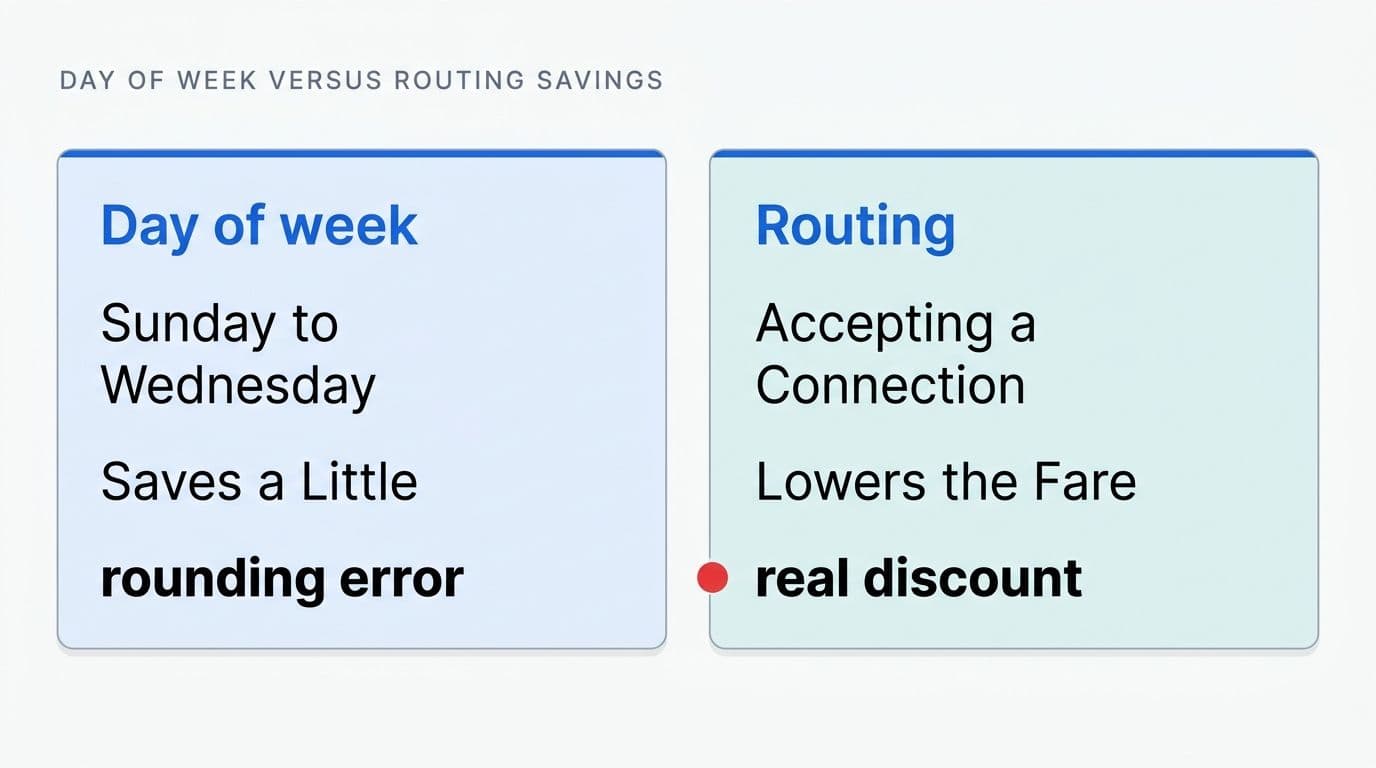
The variable that actually moves money is routing. Accepting a connection instead of a direct flight meaningfully lowers the fare in most markets we've looked at, an order of magnitude more leverage than the day-of-week shift, and the single most useful trade-off to surface in a booking UI. One extra stop buys a real discount off the price. Anyone building a flight price api into a consumer product should score results on that axis first.
To compute it properly you need both sides of the comparison in the same response set. That means you cannot filter stops out at search time. Pull the full result set, tag each itinerary by stop count, and derive the spread yourself. The same logic applies to the day-of-week question: query a ±3 day window around the target date and compare, rather than trusting a static rule.
Our google flights scraper returns the full grouped result set by default rather than a trimmed "best" list, specifically so these comparisons are possible without a second call. Two requests for one answer is the kind of thing that quietly doubles a credit bill.
Timezone validation: why your date fails in UTC
This one catches almost everyone eventually. Flight search endpoints commonly validate departure dates against UTC rather than the user's local time. Picture a user in Los Angeles at 6pm on a Tuesday. It is already Wednesday in UTC. A search for "today" or "tomorrow" gets rejected as a past date, even though the identical search works fine on the Google Flights website, which validates against the traveler's local context.
The fix is to normalize before you send. Convert the user's local date to the date as it will be evaluated server-side, and pass that explicit string rather than letting a date library serialize a timestamp with an offset you did not think about. If you are building for users spread across timezones west of UTC, write a test for the boundary case at 4pm to 11pm local, since that is where it breaks, and it will not reproduce for a developer sitting in Europe or India.
It is worth being explicit in your own API wrapper about which convention you use. A lot of integration bugs here come down to two layers each assuming the other handled conversion. Pin it down once, document it in your internal spec, and the class of bug goes away. Our docs spell out the expected date format for flight queries so there is no guessing on our side of the boundary.
Filtering separate and self-transfer tickets
Google Flights surfaces distinct and self-transfer tickets in its Cheapest tab. These are itineraries split across two airlines that are not sold as a single booking. They are genuinely cheaper, and they carry real risk: a missed connection is not the carrier's problem, bags may not transfer, and depending on the partner the traveler might need two individual bookings.

Most flight APIs, including ours today, do not expose Google's filter for excluding these. That is a real gap and we would rather say so than let you find out in production. If your product is aimed at business travelers or anyone who cannot absorb a missed connection, you will want these options out of your results.
The workaround is to filter on your side. Discrete tickets are identifiable from the response shape. The itinerary's segments carry different marketing carriers that are not alliance or codeshare partners, and the booking flow Google points to is split rather than unified. Build a small classifier against carrier pairs plus the booking link structure. Drop or flag what it catches, and surface the flag in your UI rather than discarding silently, since some price-sensitive users do want these fares as long as they know what they are buying.
We are tracking native support for this filter, and until it ships, client-side classification is the honest answer.
Empty results, retries, and reliability
Flight queries fail more often than plain search queries. The search is heavier, Google's defenses on this surface are more aggressive than on standard results pages, and some date-route combinations legitimately return nothing. Anyone promising a block-free, always-on google flights data api is overselling. What you should be evaluating is how a provider handles the failures.
On cached providers the usual folk remedy is retrying with a no-cache flag set. Forcing a fresh fetch often turns an empty body into a populated one. We removed the underlying problem instead. Every DataBlue request is a live run against Google, so there is no cache layer to bust and no stale fare to accidentally serve. An empty result from us means the search genuinely returned nothing or was blocked, not that a cached null got replayed.
Build retries anyway, since two attempts with a short backoff clears most intermittent failures. Because a request that returns no data costs no credit, retry logic on our platform does not create a cost spiral. The thing that makes retry-heavy pipelines expensive on per-request billing simply does not apply here. Set your own ceiling, log what fails, and alert on a sustained rise in the failure rate for a specific route rather than on individual errors.
For support, we run priority Slack with fast response times: no named CSM, no 24/7 phone line, just engineers in a channel. Book a 30-min demo if you want to walk through your reliability requirements before committing.
Pagination and large result sets
Flight searches return a lot of rows, and the underlying page structure batches them. A listing page typically holds around 30 entries in its JSON before additional results have to be fetched separately. If you only read the first batch, you systematically miss the long tail of cheaper, longer, or odd-routing itineraries, and that tail is exactly where the connecting-flight discount lives.
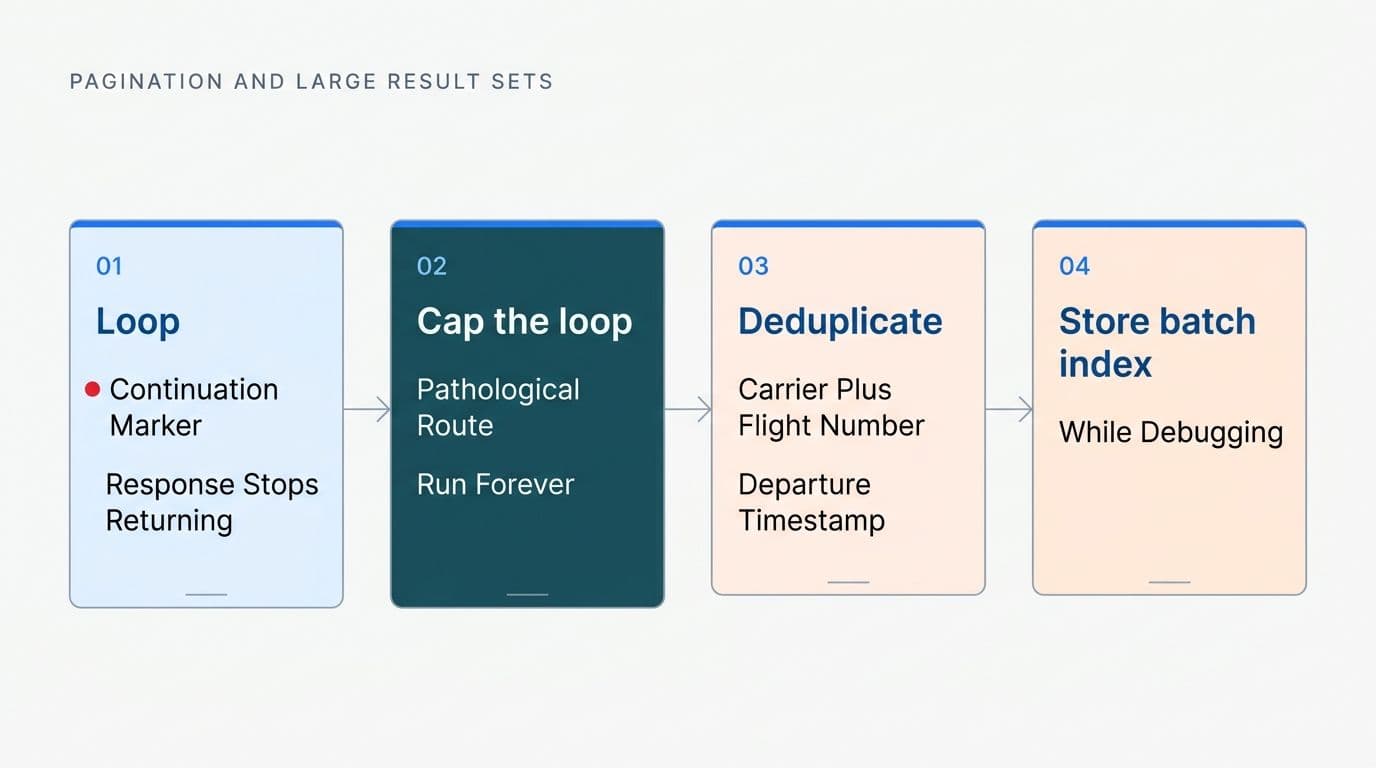
Handle it the way you would handle any paginated feed. Loop until the response stops returning a continuation marker, cap the loop so a pathological route cannot run forever, and deduplicate on carrier plus flight number plus departure timestamp, because overlapping batches do repeat entries. Store the batch index with each record while you are debugging. When counts look wrong, it is almost always a loop that exited early.
Cost-wise, remember that each additional batch is another request against your credit pool. For a fare-tracking product, decide upfront how deep you need to go. The cheapest fifty itineraries on a route is usually plenty. Pulling several hundred per query per day is how a sensible budget turns into an unpleasant one. Our endpoint weights are visible before each run, so you price a deep sweep against a shallow one before you commit to either.
Start with 1,000 free credits
A growing number of developers build on DataBlue, including teams like RankMax, which runs its SEO rank-tracking layer on our Google SERP API. Several customers have migrated large keyword-tracking workloads off SerpAPI with minimal friction, helped by our Firecrawl-compatible response schema. If you are migrating, the output-format mapping is usually the only real work.
Honest caveats: we cover 100+ countries, not every micro-locale. We are not SOC 2 Type II or ISO 27001 certified yet. Both are on the roadmap. We sell the scraping and SERP piece, not a full proxy and dataset line. And scraping sits inside the target site's terms and your own legal review. We will not tell you otherwise.
Signup is self-serve, with no minimums and no annual contract. You get 1,000 one-time credits free, no credit card.
Start Free · See Pricing · Read the Docs
Frequently Asked Questions
Does Google have a public API for Google Flights?
No, Google does not publish a public Google Flights API. Instead, Google publishes a web app that renders itineraries, fares, and filters through a heavily obfuscated front end. What developers actually need is an endpoint that runs the search live, parses the result, and returns clean JSON.
What information does a Google Flights API return?
A usable Google Flights API returns structured data including departure and arrival times with airport codes, airline and operating carrier, flight numbers, total duration, number of stops, layover airports and durations, cabin class, baggage hints, and price with currency. It also returns the grouped structure Google uses, with best-value results separated from cheaper, more awkward options.
When do airline fares actually bottom out?
Domestic and international routes tend to bottom out at different points ahead of departure. Holiday travel like Christmas follows its own pattern, typically bottoming out in late October through mid-November, well before the panic-buying surge that drives December fares up. Determining the booking window requires querying the same route repeatedly over weeks to fit a curve against days-to-departure.
How much money can you save by flying on a different day of the week?
Shifting a departure from Sunday to Wednesday saves only a small amount that is far too small to be worth reorganizing a trip around and disappears inside normal fare volatility. The effect is an order of magnitude smaller than the savings from accepting a connecting flight instead of a direct one.
Why do flight searches fail when validating dates in UTC?
Flight search endpoints commonly validate departure dates against UTC rather than the user's local time, causing searches for "today" or "tomorrow" to be rejected as past dates even though they work on Google Flights itself. The fix is to convert the user's local date to the date as it will be evaluated server-side and pass that explicit string rather than letting a date library serialize a timestamp with an offset.